Connect banks, cards, investments and loans securely through Plaid. Your bank login goes straight to Plaid and your bank, never to us.
Balances, transactions, net worth and subscriptions are brought together and ordered automatically.
Follow your net worth over time, plan when you wish to, and receive quiet notices for low balances, new subscriptions and price changes.

Your balance, this week and the month so far, on one calm screen.

Transactions are ordered automatically, so your attention goes to decisions, not data entry.

Cash, credit, investments and loans roll up into a single number you can watch over time.
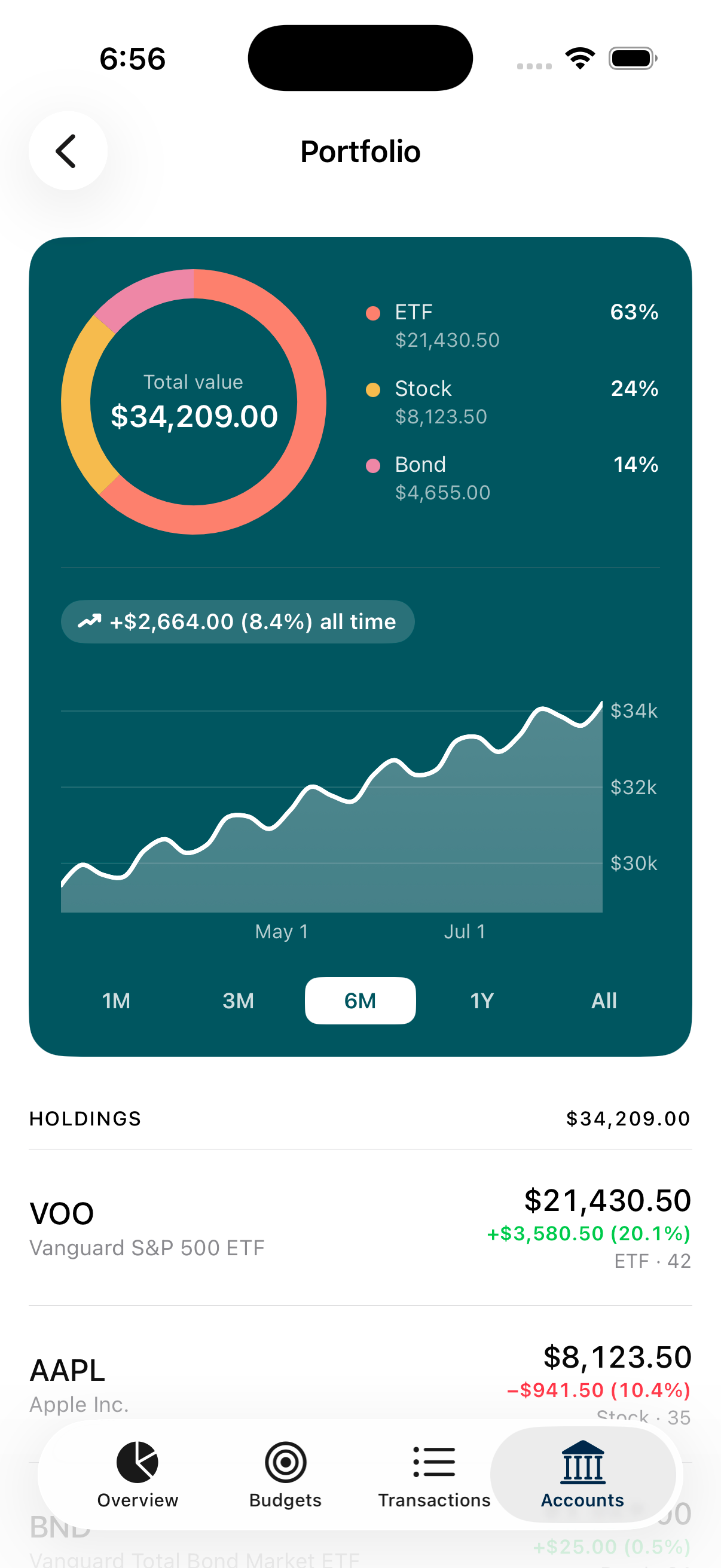
See how your holdings are allocated and how they are doing, across every brokerage you link.
Every account, followed daily.
Every transaction, categorized for you.
Set once, kept current.
Allocation and gain/loss, daily.
Found automatically. Flagged on price hikes.
One plan, shared with up to six.
MizuFlow is read-only. It can show you your money, but it can never move it.
We never move, send or hold your money.
You sign in with Plaid and your bank. We never see or store your bank credentials.
Connections use TLS, and bank access tokens are encrypted at rest with Google Cloud KMS.
We don't sell your data or use it for advertising.
Disconnect a bank or delete your account any time in Settings. Read our privacy policy
No. MizuFlow is read-only: it shows balances, transactions and holdings, and it can't move, send or hold funds.
Premium is $9.99 a month or $79.99 a year for one person. Household is $12 a month or $100 a year for up to 6 people. Every feature is included on both plans. See pricing for details.
No. MizuFlow doesn't offer a free trial. Your plan starts when you subscribe, and you can cancel any time.
Yes. Cancel from Settings or your App Store subscription settings, with no phone call or email required.
Through Plaid, a widely used service for securely connecting financial accounts. You sign in with Plaid and your bank directly, so your login never reaches us.
Yes. Delete your account in Settings and your MizuFlow data is removed and Plaid is told to remove the connection. You can also disconnect a single bank at any time.
Household lets up to 6 people share one combined financial picture. Joining is always by invitation, everyone sees what will be shared before agreeing, and anyone can leave at any time.